Staying Safe
Fake USDT: How to Check the Contract Address of the USDT You Received
The name and logo on a USDT balance are picked by whoever created the token. This walk-through shows where to find the contract address in a block explorer and which addresses Tether lists as its own.
To find out whether the USDT in your wallet is real, open the transfer in a block explorer, click through to the token, and compare its contract address with the one Tether publishes for that network. On Tron, Ethereum, Solana and the other networks where Tether lists a USD₮ contract, a match means you hold USD₮, which is how Tether writes the ticker, and a mismatch means you hold a different token that someone named USDT. BNB Smart Chain, where Tether lists no USD₮ contract, works differently and is covered further down.
The name and the green logo can't settle the question. Anyone can create a token on Tron or Ethereum and give it any name, symbol and picture without asking permission. The contract address is the token's identifier on the blockchain, and a copy can't share it.
Checking the token in a block explorer
A block explorer is a website that displays the transfers recorded on a blockchain. Tether's own page links to Tronscan for Tron, Etherscan for Ethereum and explorer.solana.com for Solana.
- Find the transfer. If the sender gave you a TxID (the transaction's ID, also called a hash), paste it into the explorer's search box. Without one, search for your own wallet address and open the incoming transfer.
- In the transfer details, the token appears as a link. Open it. You land on the token's own page, which shows the full contract address.
- Copy that address, open Tether's Supported Protocols page and search for it with your browser's find function (Ctrl+F, or Cmd+F on a Mac). You can also compare the two strings character by character.
- If Tether lists a USD₮ contract for that network and the address doesn't match it, the token is not USD₮, whatever name and logo the wallet displays. BNB Smart Chain is a separate case, covered further down.
Compare the whole string. Addresses can be generated so that their first and last characters copy those of another address, and a glance at both ends would pass a fake.
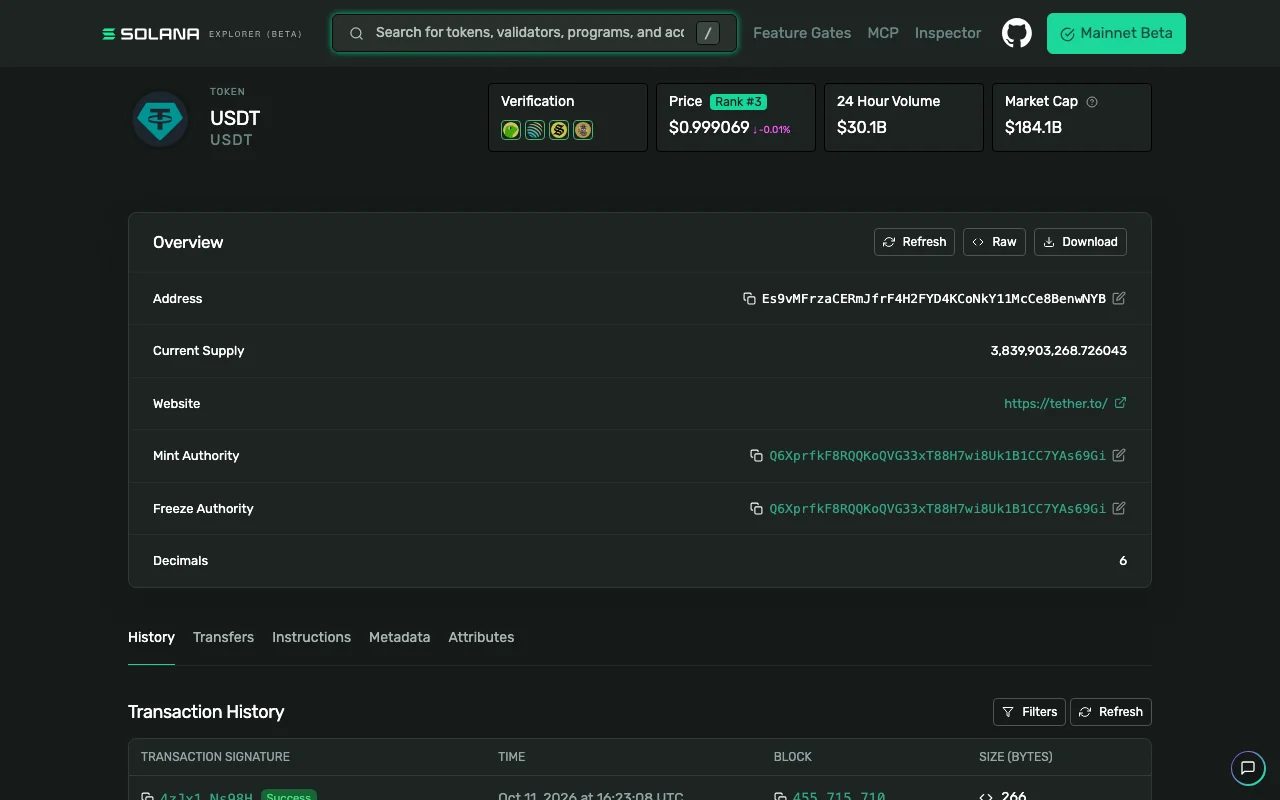
Token page for USDT on explorer.solana.com, captured 12 October 2026.
On the Solana explorer's token page, the contract address sits in the Overview panel, in the field labelled Address. The same panel has a Website field showing https://tether.to/. Whoever creates a token fills in that field, so a copy can display the same website. The address is the part to compare.
A wallet may show no dollar value next to a token it doesn't recognise. Take that as a reason to run the check. A price next to the token confirms nothing.
The addresses Tether publishes
These are the USD₮ contracts for three networks, as listed on Tether's page on 12 October 2026:
| Network | Label on wallet and exchange screens | USD₮ contract address |
|---|---|---|
| Tron | TRC20 | TR7NHqjeKQxGTCi8q8ZY4pL8otSzgjLj6t |
| Ethereum | ERC20 | 0xdAC17F958D2ee523a2206206994597C13D831ec7 |
| Solana | Solana | Es9vMFrzaCERmJfrF4H2FYD4KCoNkY11McCe8BenwNYB |
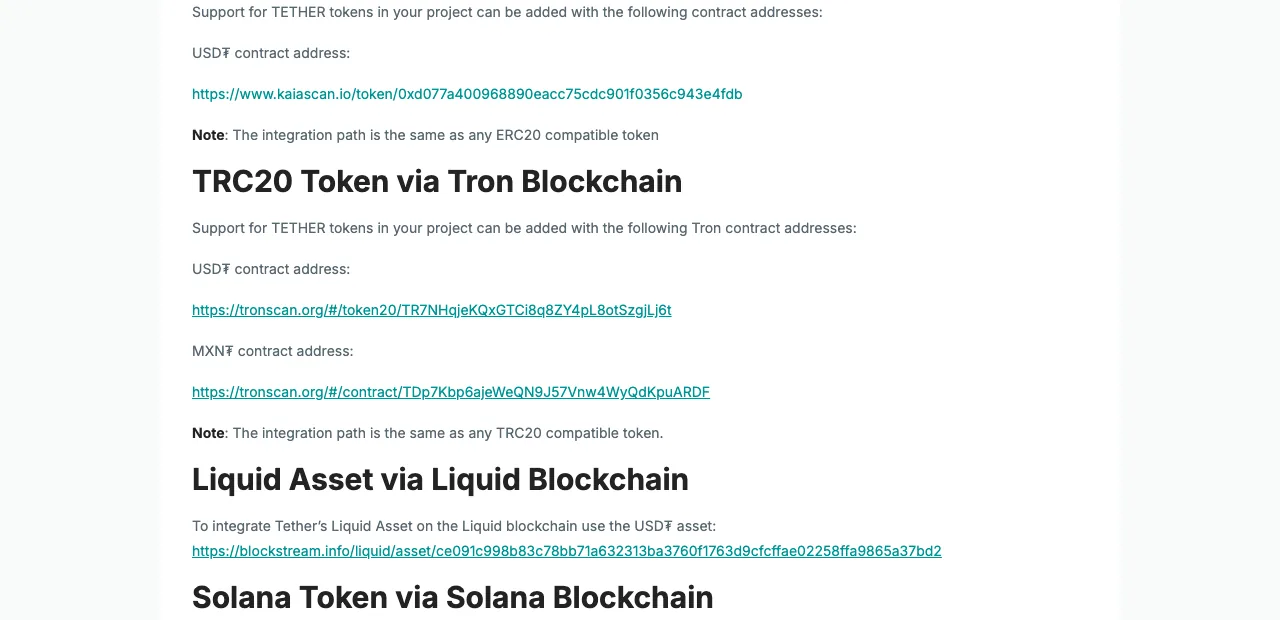
TRC20 section of Tether's Supported Protocols page. Address re-checked against the live page on 12 October 2026.
The screenshot shows a second contract under the USD₮ one: MXN₮, Tether's Mexican-peso token. The Ethereum section lists three: USD₮, XAU₮ (gold) and MXN₮. Knowing that a token was issued by Tether therefore leaves the check unfinished. It has to be the USD₮ contract, on the network the sender used.
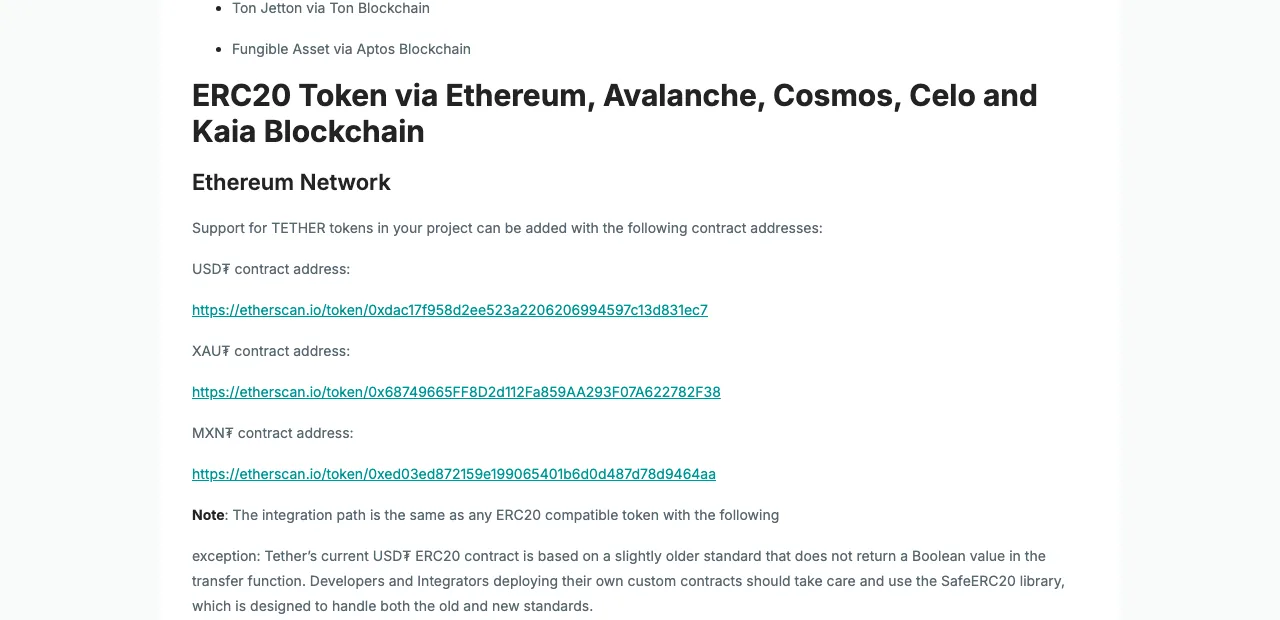
Ethereum Network section of the same page. Address re-checked against the live page on 12 October 2026.
Tether's page prints the Ethereum address in lowercase, and the table above mixes upper and lower case. Both are the same address: for Ethereum addresses, letter case makes no difference when you compare.
The page also lists USD₮ contracts for Avalanche, Kava, Celo, Kaia, Liquid, Polkadot AssetHub, Tezos, Near, TON and Aptos.
BNB Smart Chain is the exception. On 12 October 2026 its section listed one contract, for XAU₮, and none for USD₮. The "USDT BEP20" that exchanges offer can't be checked against Tether's list, so the reference for that network is the deposit or withdrawal screen of the exchange you use. Our guide to choosing between TRC20, ERC20 and BEP20 for a USDT transfer explains which blockchain each label stands for.
Where fake USDT comes from
A payment sent straight to your wallet
Suppose you sell something to a stranger who pays in USDT, wallet to wallet. A balance appears, you hand over the goods, and afterwards the token can't be sold anywhere. The explorer check belongs before the handover.
"Flash USDT"
Sellers advertise "flash USDT": tokens said to appear in a wallet and expire after a few weeks, or software said to generate them. Real USD₮ transferred on a blockchain has no expiry date. Anything that vanishes on a schedule would fail the address check above, and you would have paid for it with real money.
A token you never asked for
A token with a USDT-like name turns up in your wallet, sometimes with a web address written into the token name and an invitation to claim or swap it. Left alone, the token does nothing. The risk is the website. To "claim", it asks you to connect your wallet and sign, and that signature can be an approval: permission for a third party to move other tokens you hold. Unsolicited tokens are one of the situations covered in our guide to crypto scam messages and how to respond.
Zero-value transfers from a lookalike address
Your history shows a transfer for zero, or for a tiny amount, from an address that begins and ends like one you send to. This is known as address poisoning. It works if you later copy that address out of your history and send funds to it. Take addresses from your wallet's address book, or from the recipient through a channel you already use with them.
If the address doesn't match
Don't try to sell, swap or "unlock" the token on any site recommended to you. It can sit in the wallet untouched, and if your wallet has an option to hide a token, use that.
If you already connected the wallet to a site and signed something, review the approvals you have granted and revoke any you don't recognise. On Ethereum-compatible networks, Revoke.cash does this. On other networks, look for an approvals or permissions section in the explorer or in the wallet itself. If you can't tell what you signed, moving the rest of your funds to a new wallet is the cautious choice.
If you handed over money, goods or crypto in exchange, keep the TxID, the address that sent the token and the conversation. A deal done outside an exchange has no dispute to open, and the remaining route is a report to the police or cybercrime unit where you live. Anyone who then contacts you offering to recover the loss for an upfront fee is running a second scam.
Before accepting USDT from a stranger
Agree the network in advance so you know which contract to expect. Asking for TRC20, ERC20, Solana or another network on Tether's list gives you a published address to compare against. When the transfer arrives, open it in the explorer and compare the contract with Tether's page before you hand anything over. If the other side asks you to add the token to your wallet by pasting a contract address they send you, stop there and take the address from Tether's page.