Getting Started
USDT Withdrawal Network: TRC20, ERC20 or BEP20, and What to Do If You Picked the Wrong One
The network for a USDT withdrawal is chosen from the recipient’s deposit screen first and by fee second. With the per-network fees Binance listed on 7 October 2026, a pre-send checklist, and who to contact if the transfer went out on the wrong network or without a memo.
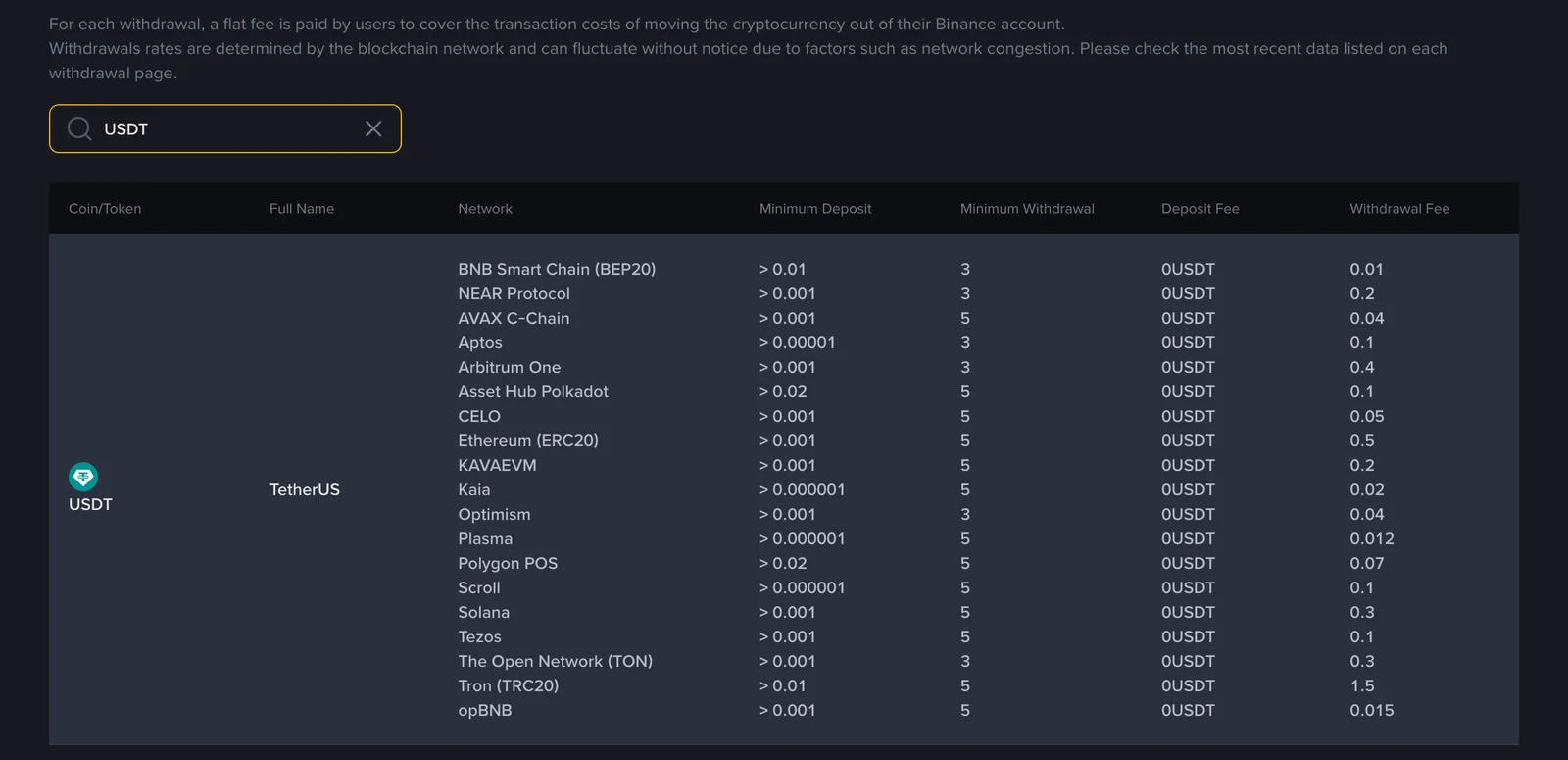
On 7 October 2026 Binance listed 19 networks for a USDT withdrawal, with fees running from 0.01 USDT to 1.5 USDT. The cheapest one is only an option if the place you are sending to accepts it, so the choice starts on the recipient's deposit screen: pick from the networks shown there, and compare fees among those.
Why one coin comes with a list of networks
A "network" on a withdrawal screen is the blockchain the transfer travels on. Tether issues USDT on several of them at once, and its Supported Protocols page asks integrators to treat the tokens as interchangeable: "1 TETHER token on Blockchain X = 1 TETHER token on Blockchain Y".
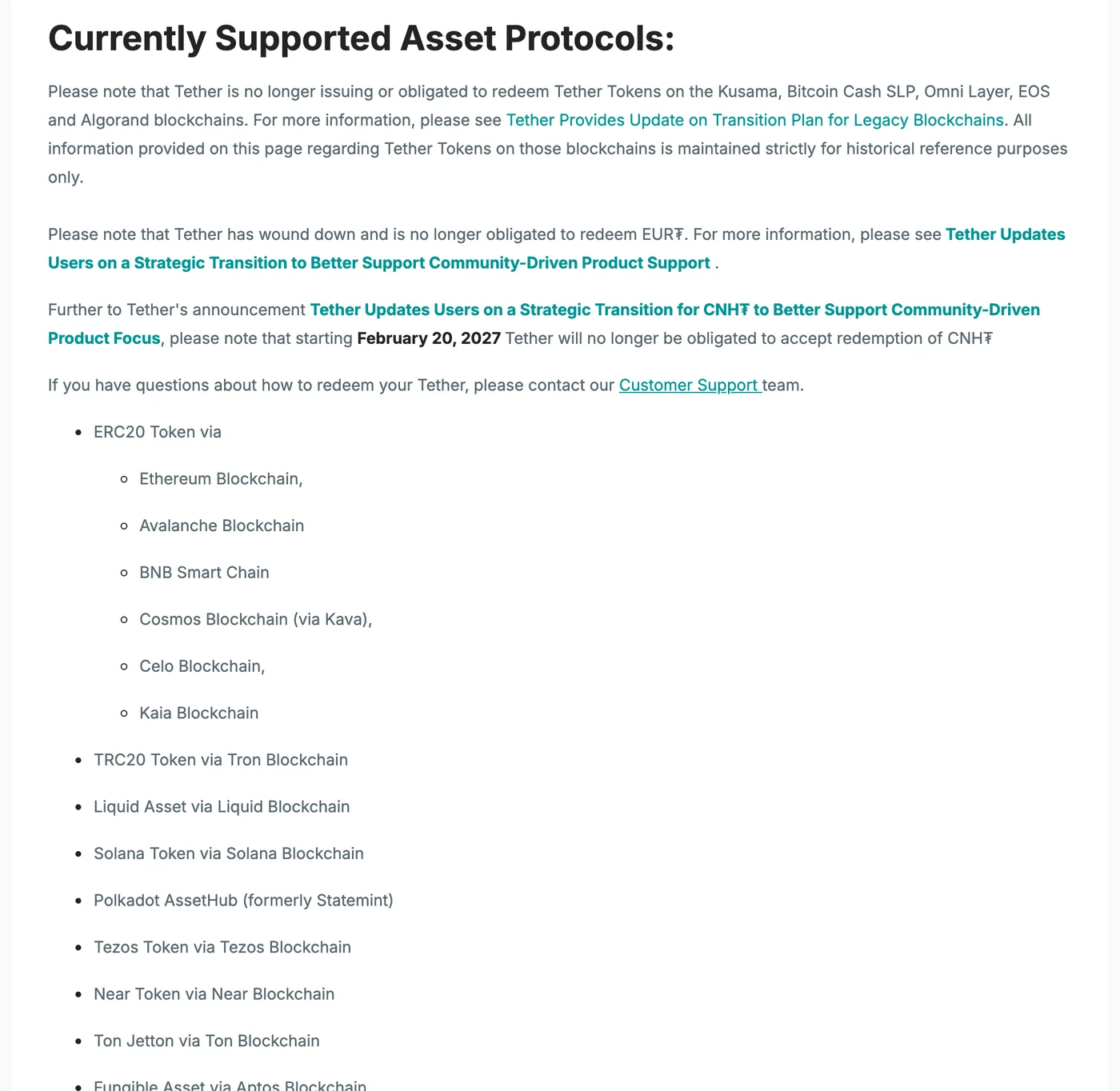
Tether's Supported Protocols page, captured 7 October 2026.
Equal in value, though, and still separate. Each blockchain keeps its own ledger. If your USDT leaves over Tron, the recipient has to be watching Tron for it; an exchange that expects your deposit on Ethereum never sees a transfer that arrived somewhere else.
| Label on the withdrawal screen | Blockchain | Address starts with |
|---|---|---|
| TRC20 / Tron | Tron | T |
| ERC20 / Ethereum | Ethereum | 0x |
| BEP20 / BNB Smart Chain | BNB Smart Chain | 0x |
The letters "ERC20" cause some confusion because they name a token format, and Tether uses that format on more than one chain. In the screenshot, "ERC20 Token via" is followed by Ethereum, Avalanche, BNB Smart Chain, Kava, Celo and Kaia. Read the chain name printed next to the label.
BNB Smart Chain is an odd entry in that list. It appears there, but on the day of the screenshot the only contract address Tether published for it was XAU₮, its gold token, with no USD₮ contract. The "USDT BEP20" an exchange offers therefore can't be checked against Tether's page; the exchange's own deposit screen is the reference for it.
Older tutorials talk about USDT on Omni. The notice at the top of the screenshot covers that: Tether is no longer issuing or obligated to redeem its tokens on Kusama, Bitcoin Cash SLP, Omni Layer, EOS and Algorand.
If blockchain, gas or token contract are still hazy, they are defined in our glossary of crypto terms in plain English.
How to choose
Read the recipient's deposit screen first
Sending to another exchange: log in there, open the USDT deposit page and see which networks it offers. When you select one, the address it shows you is valid for that network only.
Sending to a wallet you hold yourself: check which network the wallet is set to before you copy the address. A wallet often has the same address on Ethereum and on BNB Smart Chain, so the address can't tell you which network to use. The network selected in the wallet does, along with whether the wallet supports that chain at all.
An address saved in an old chat is not a reference, and neither is a general impression that TRC20 is what people use. If a network is missing from the recipient's screen, it is out, however cheap it is.
With a 0x address, check the network twice
Tron addresses start with T. Addresses on Ethereum, BNB Smart Chain, Arbitrum and other Ethereum-compatible chains start with 0x and share one format.
Paste a T address and select ERC20, and the withdrawal form will normally reject it on format. The mistake that gets through is the other one: you were given a 0x address for BNB Smart Chain and selected ERC20. The format is valid, so nothing stops the withdrawal.
Among the networks both sides support, compare the fee
Exchanges charge a flat amount per withdrawal, and it differs by network. These figures are from Binance's fee page (Deposit/Withdrawal → Crypto, search "USDT") on 7 October 2026:
Binance fee page, Deposit/Withdrawal → Crypto, captured 7 October 2026.
| Network | Withdrawal fee (USDT) | Minimum withdrawal (USDT) |
|---|---|---|
| BNB Smart Chain (BEP20) | 0.01 | 3 |
| Plasma | 0.012 | 5 |
| opBNB | 0.015 | 5 |
| Optimism | 0.04 | 3 |
| Polygon POS | 0.07 | 5 |
| Solana | 0.3 | 5 |
| The Open Network (TON) | 0.3 | 3 |
| Arbitrum One | 0.4 | 3 |
| Ethereum (ERC20) | 0.5 | 5 |
| Tron (TRC20) | 1.5 | 5 |
Take a 50 USDT withdrawal. Over TRC20, 48.5 arrives; over BEP20, 49.99. Tron was the most expensive of the 19 networks that day at 150 times the BEP20 fee, which is the reverse of its reputation as the cheap route.
These numbers are a snapshot. The same page states that Binance does not charge deposit fees, and that withdrawal rates "are determined by the blockchain network and can fluctuate without notice due to factors such as network congestion". When we looked at this page on 18 September 2026, Ethereum was at 0.3 and Arbitrum One at 0.1. The amount you will be charged is the one on the withdrawal screen when you confirm.
The withdrawal fee is one line on a longer bill. The rest of it, from card charges to the spread, is added up in what a $2,500 crypto trade actually costs.
Sending from your own wallet needs that chain's coin
An exchange takes its withdrawal fee out of the USDT itself. From a wallet you control, the fee is paid in the chain's own coin: TRX on Tron, ETH on Ethereum, BNB on BNB Smart Chain.
Tron has its own vocabulary for this. Its developer documentation describes two resources: Bandwidth, which covers the byte size of a transaction, and Energy, which every smart contract call consumes. When an account's staked resources and free quota don't cover the cost, the network burns TRX from the sender's balance. A TRC20 USDT transfer is a contract call, so a wallet holding USDT and no TRX has nothing to pay with.
Before you confirm the withdrawal
- Put the two screens side by side and compare the network name. One may say "TRC20" and the other "Tron (TRC20)"; that is the same chain. With a 0x address, establish whether it is Ethereum, BNB Smart Chain or something else. If the names don't match, stop there.
- Look for a memo or tag on the deposit screen. Binance's help centre gives XRP and TON as examples of deposits that need one. Copy it exactly. Without it the money reaches the exchange and is not credited to your account automatically.
- Subtract the fee and check that the amount clears the minimum withdrawal.
- The first time you use an address or a network, send a small amount first and wait until the recipient shows it. That costs one extra fee, and the test itself has to clear the minimum.
- Copy the TxID (transaction hash) from your withdrawal history. It is the first thing a recovery form asks for.
After pasting the address, read all of it. Checking only the first and last few characters leaves room for an address that was swapped while it sat in your clipboard.
If the withdrawal already went out on the wrong network
Once a transfer is recorded on a blockchain, the exchange you withdrew from cannot pull it back. Who can help depends on who controls the destination address.
The address belongs to your own wallet
Binance Academy's article on crypto transferred to the wrong network (updated 12 June 2026) explains that BNB Smart Chain and Ethereum use the same address format, so the funds do arrive at your address, on the chain you didn't intend.
If you hold the seed phrase or private key and the wallet supports both chains (the article names MetaMask and Trust Wallet), switch the wallet to the network the tokens landed on. They should show up, in some cases after you add the token contract. Moving them takes a little BNB or ETH for the fee. If the wallet supports only one of the two chains, the article's route is to import your key into a wallet that supports both. All of this happens on your own device, and none of it involves giving your seed phrase to another person.
The address belongs to an exchange
You don't hold the private key there, so you can't move anything yourself. The same article says recovery "depends entirely on the platform", that most exchanges will not be able to recover funds sent on an unsupported network, and that Binance cannot step in when the receiving wallet is held by another provider. The request goes to the support team of the exchange that received the transfer.
For deposits into your own Binance account, Binance's two pages don't say quite the same thing. The Academy article's FAQ answers "Does Binance recover wrong-network deposits?" with a flat no. The help centre page on self-service recovery (updated 29 May 2026) does take applications for deposits that have not arrived after an hour, and its fee table includes a row for tokens deposited on unsupported EVM networks:
| Type of retrieval | Estimated time | Fee |
|---|---|---|
| Deposit without memo or with the wrong memo | 7 working days | Network withdrawal fee |
| Deposit not credited | 5 working days | Free |
| Smart retrieval | 7 working days | 1 USDT |
| Tokens deposited on unsupported EVM networks | 30 working days | 20 USDT |
Read together, the safe assumption is that an application is possible and a result is not promised. The help centre page says so itself: recovery is not guaranteed, the times can run longer, and the fee is collected only if the retrieval succeeds. The transaction has to show as confirmed on the blockchain, and the form asks for the TxID, coin, deposit network and address, and amount. Three cases are excluded outright: a withdrawal from Binance to a mistyped address, a deposit you made into another user's account, and an application on someone else's behalf. If the destination account belongs to a friend or a merchant, the account holder has to file the request.
The network was right but the memo was missing
The money reached the exchange and is sitting unassigned. This is the first row of the table. The request goes through the receiving exchange's support, with the TxID and the memo that should have been attached.
Someone offers to recover it for an upfront fee
Describe the problem in a public group and private messages from "support agents" and "recovery specialists" tend to follow. An exchange handles these cases through its own app or website, does not ask for a deposit to "unlock" funds, and has no use for your seed phrase. Our guide to crypto scam messages and how to respond quotes the usual opening lines.